
本文最后更新于137 天前,其中的信息可能已经过时,如有错误请发送邮件到annze0414@gmail.com
vue3组件通信和vue2的区别:
移出事件总线,使用mitt代替.
vuex换成pinia
把.sync优化到v-model中
把$listeners所有的东西合并到$attrs中
$children被砍掉了
常见搭配形式:
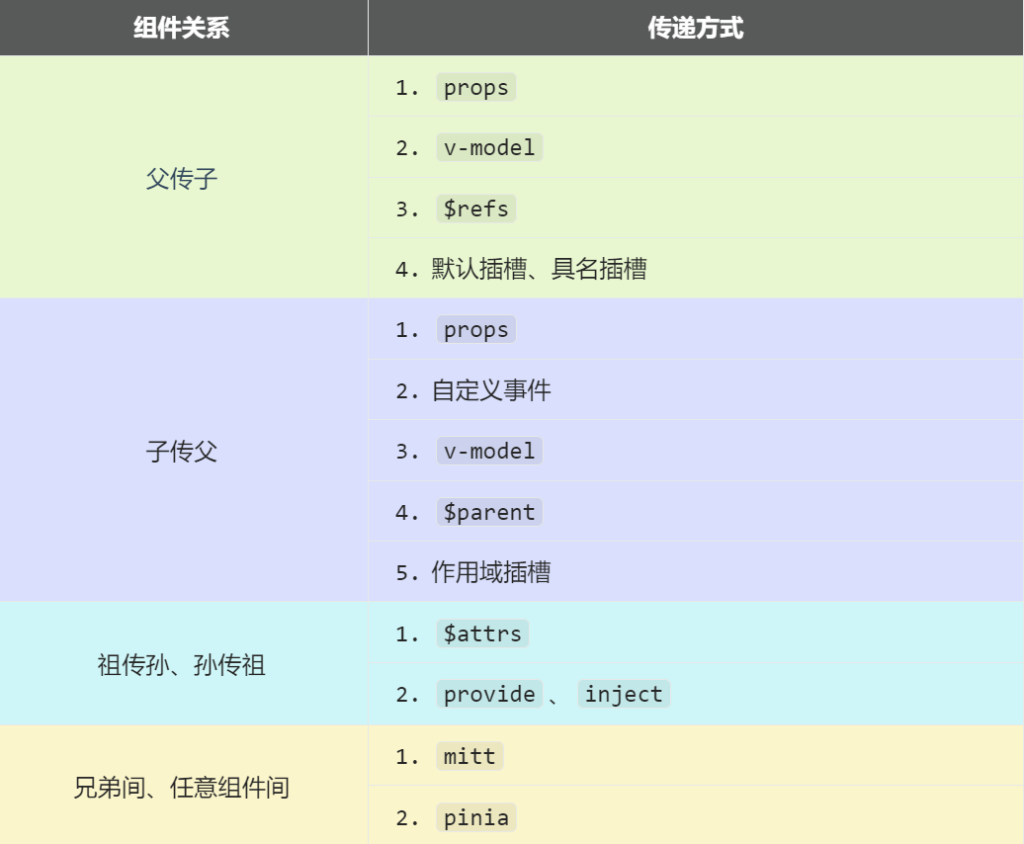
props
概述:props是使用频率最高的一种通信方式,常用于: 父 <—>子
若父传子: 属性值是非函数
若子传父: 属性值是函数
父组件:
<template>
  <div class="father">
    <h3>父组件,</h3>
		<h4>我的车:{{ car }}</h4>
		<h4>儿子给的玩具:{{ toy }}</h4>
		<Child :car="car" :getToy="getToy"/>
  </div>
</template>

<script setup lang="ts" name="Father">
	import Child from './Child.vue'
	import { ref } from "vue";
	// 数据
	const car = ref('奔驰')
	const toy = ref()
	// 方法
	function getToy(value:string){
		toy.value = value
	}
</script>
子组件:
<template>
  <div class="child">
    <h3>子组件</h3>
		<h4>我的玩具:{{ toy }}</h4>
		<h4>父给我的车:{{ car }}</h4>
		<button @click="getToy(toy)">玩具给父亲</button>
  </div>
</template>

<script setup lang="ts" name="Child">
	import { ref } from "vue";
	const toy = ref('奥特曼')

	defineProps(['car','getToy'])
</script>
自定义事件
概述:自定义事件常用于: 子 => 父
注意区分好原生事件、自定义事件
原生事件:
- 事件名是特定的(click、mouseenter等等)
- 事件对象$event是包含事件相关的对象(pageX、pageY、target、keyCode)
自定义事件:
- 事件名称是任意名称
- 事件对象$event:是调用emit时所提供的数据,可以是任意类型 ! ! !
示例:
<!--在父组件中,给子组件绑定自定义事件:-->
<Child @send-toy="toy = $event"/>

<!--注意区分原生事件与自定义事件中的$event-->
<button @click="toy = $event">测试</button>
//子组件中,触发事件:
this.$emit('send-toy', 具体数据)mitt
概述:与消息订阅与发布(pubsub)功能类似,可以实现任意组件间通信
安装mitt
npm i mitt新建文件: src/utils/emitter.ts
// 引入mitt
import mitt from "mitt";

// 创建emitter
const emitter = mitt()

/*
  // 绑定事件
  emitter.on('abc',(value)=>{
    console.log('abc事件被触发',value)
  })
  emitter.on('xyz',(value)=>{
    console.log('xyz事件被触发',value)
  })

  setInterval(() => {
    // 触发事件
    emitter.emit('abc',666)
    emitter.emit('xyz',777)
  }, 1000);

  setTimeout(() => {
    // 清理事件
    emitter.all.clear()
  }, 3000);
*/

// 创建并暴露mitt
export default emitter
接收数据的组件中:绑定事件、同时在销毁前解绑事件:
import emitter from "@/utils/emitter";
import { onUnmounted } from "vue";

// 绑定事件
emitter.on('send-toy',(value)=>{
  console.log('send-toy事件被触发',value)
})

onUnmounted(()=>{
  // 解绑事件
  emitter.off('send-toy')
})
提供数据的组件在合适的时候触发事件
import emitter from "@/utils/emitter";

function sendToy(){
  // 触发事件
  emitter.emit('send-toy',toy.value)
}
注意这个重要的内置关系, 总线依赖着这个内置关系
测试评论